Setting Controls for an iPhone, iPad, and iPod Touch

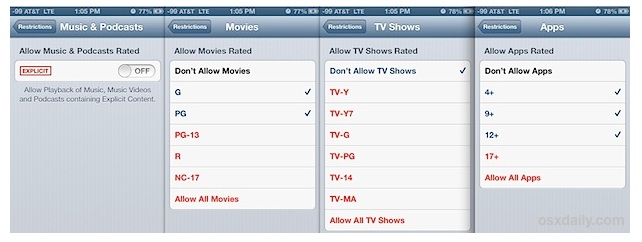
From OSX Daily, here’s an extremely useful guide for filtering content and setting parental controls.

How to Use Restrictions as Parental Controls on an iPhone, iPad, and iPod Touch.

It’s written with super clear instructions and includes plenty of screen shots… and while many are familiar with the restrictions for in-app purchases, I don’t think everyone’s aware of the options they have available for protecting kids from explicit language and content.

A highly recommended read for anyone working or living with kids and devices…
More hints and tips in the classroom...

The Blue Zones Project

Hey 6th graders! You just learned about the Wellness Wheel and the four main components of our health: Physical, Social, Emotional and Mental. You also learned

PBL Health

Hey #HealthEd teachers, here’s a link for all of the resources I shared in the PhysEdSummit and APPEC 2016 workshops. For free PD, here’s a copy of

Evaluating Health Websites

Hey 6th graders! Did you know that online health searches are now the third most popular activity on the web? While googling information about our

Healthy Choices Letter

Hey 7th graders, The time has come to pass on your wisdom by writing a letter to incoming 6th graders about how to stay healthy