Setting Controls for an iPhone, iPad, and iPod Touch

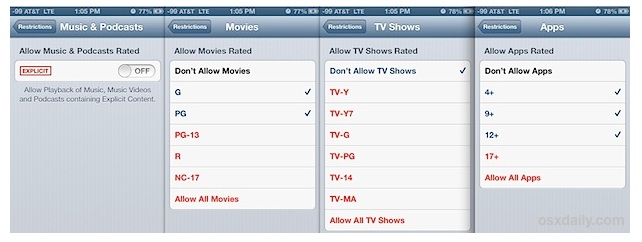
From OSX Daily, here’s an extremely useful guide for filtering content and setting parental controls.

How to Use Restrictions as Parental Controls on an iPhone, iPad, and iPod Touch.

It’s written with super clear instructions and includes plenty of screen shots… and while many are familiar with the restrictions for in-app purchases, I don’t think everyone’s aware of the options they have available for protecting kids from explicit language and content.

A highly recommended read for anyone working or living with kids and devices…
More hints and tips in the classroom...

EARCOS WW 2017

EARCOS Weekend Workshop Agenda and Resources: Designing a Health & Wellness Program to Meet the Unique Needs of the International Student Saturday, September 12th Morning

PBL: Healthy Eating

Healthy Eating: If you’re looking for ways to incorporate project-based learning into your Health class, (and let’s be honest here, you should be!) then why

Student Created Tech Use Policy

  Download your own editable doc here: My UP Family Agreement Korean My.U.P. Chinese My.U.P. In 2011, shortly after our school went 1-to-1, our 8th grade Health classes

Procrastination

Procrastination is a crime, it only leads to sorrow. I can stop it anytime, I think I will tomorrow… I learned that little jingle back